Mojo Redesign Concept
Redesign concept for a design portfolio. This is not the official Mojo website, and the form below sends nothing.
Get a demo

Mojo — school management system

Streamlining school operations so educators can focus on what matters most: teaching and student growth

One month of free access after the demo
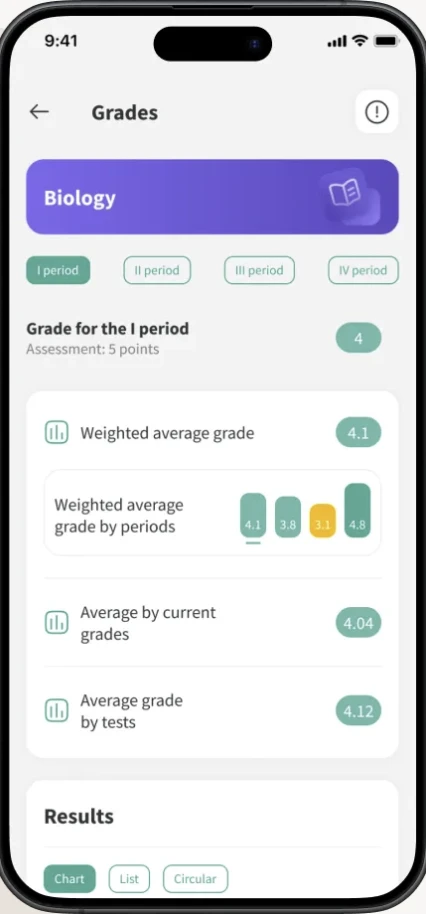
Mojo mobile app showing a student's grades in Biology
  • All school processes are under control
  • Save teachers’ time
  • Boost parent engagement and increase NPS

Schools that trust Mojo

We work with schools following various educational standards (British, Cambridge, IB and local) and help them reach new heights with the expertise of market leaders.


  • 50,000+users rely on Mojo every day
  • 11countries
  • 24schools shown below
  • Heritage School
  • TISA
  • The Russian School of Abu Dhabi
  • One! International School
  • New Tone School
  • Kinderville
  • Rittel School
  • La Berezka
  • Nyberg School
  • School logo
  • Setun
  • Astreya
  • Unischool Cambridge International School
  • Adriatic International
  • Oxbridge International School
  • The Knowledge Academy
  • Intellectum Academy
  • Discovery
  • Edumonte
  • School logo
  • Gymnasium Lider
  • Snegiri
  • Sverkhnovaya
  • Schastlivoe Detstvo

Built for everyone at school

Free up time for what truly matters.
For School Leaders

The whole school in one interface

  • Flexible customization for your school’s unique model
  • Tools to manage the entire educational process
  • Increase your school’s value in the eyes of parents

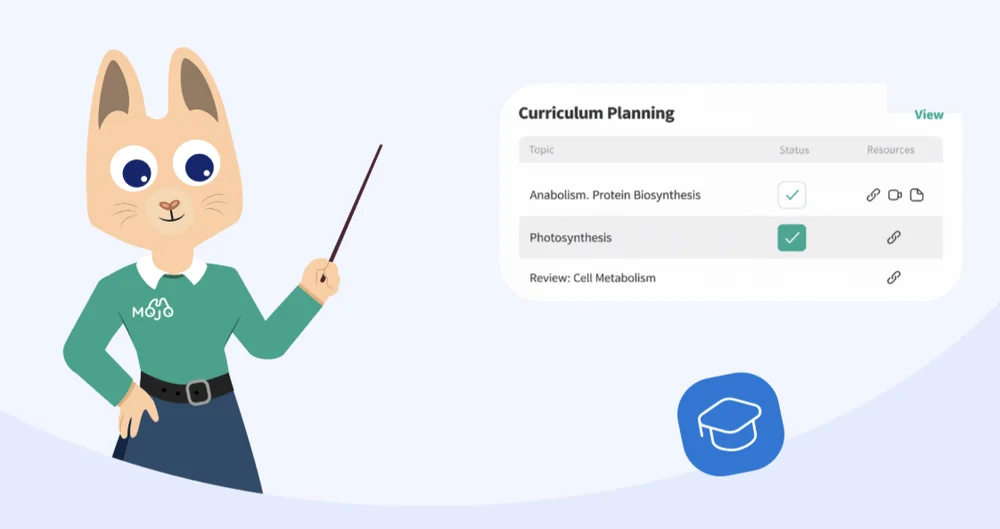
For Teachers

Planning, grading and reports in one place

  • All the learning information in one place
  • Save time on lesson planning and reporting
  • Easy-to-use digital gradebook

For Parents and Students

Timetable, homework and grades on a phone

  • All learning information in a mobile app
  • Open school — transparent processes
  • Portfolio from enrollment to university choice

All processes in one place — in Mojo

We help schools streamline over 60 processes, from assessment and attendance to admissions, surveys, healthcare and HR.

Mojo makes everyday routines feel effortless and automatic.All 43 modules

Video about Mojo

See how a school day runs on the platform before you talk to anyone.

Watch a video

Convenient on any device

At school, at home, or on the go, Mojo is always at hand: in the browser and in a user-friendly mobile app for parents, students, and teachers.
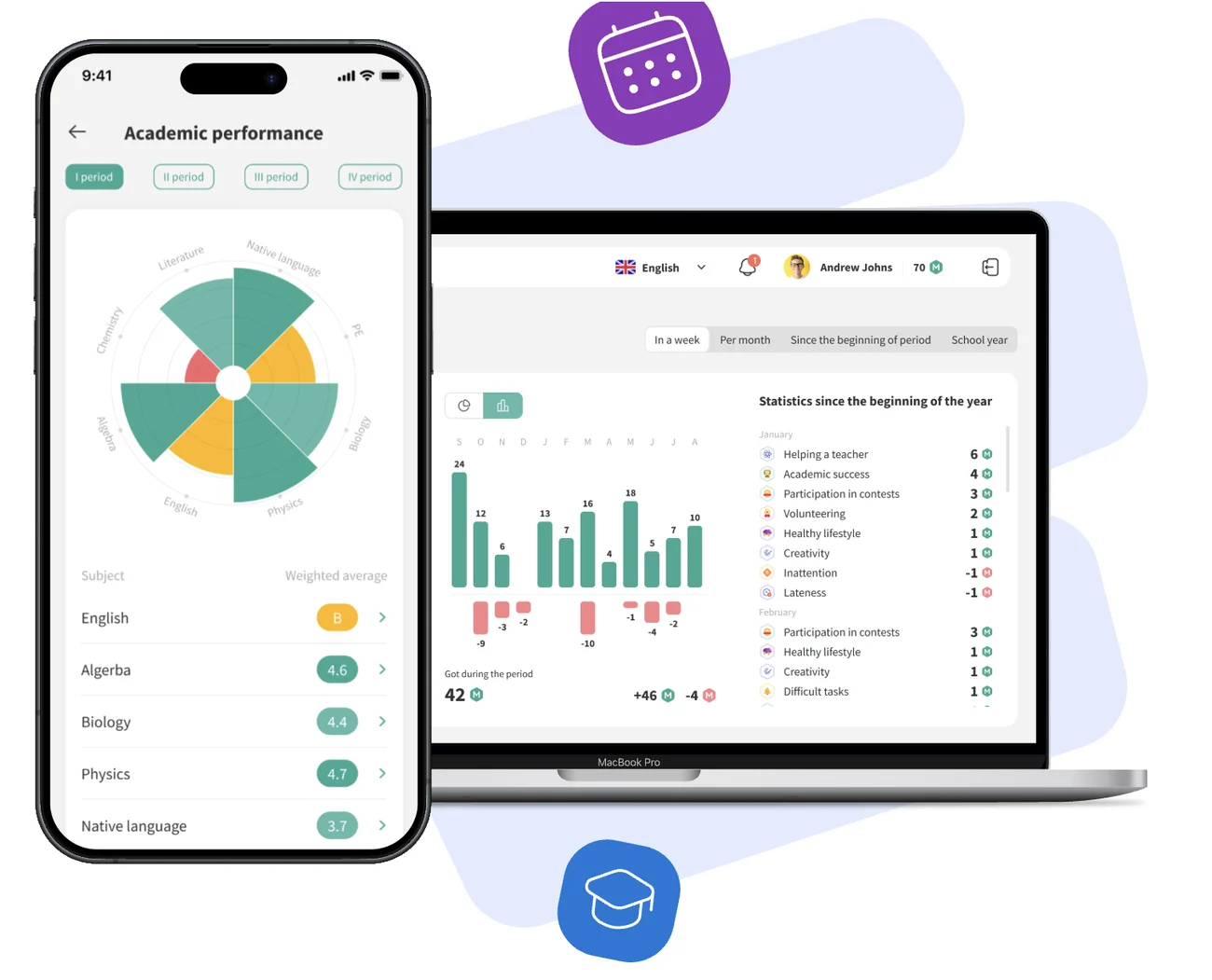
Mojo on a phone and a laptop: academic performance by subject and yearly statistics

Mojo pricing

It depends on the number of students. One yearly fee and a one-time setup fee.

Every plan includes onboarding and 1.5 months of intensive support.

What is included

    Feedback from school leaders

    Directors and founders on what changed after they moved to Mojo.

    Implementation stages of Mojo

    Seven steps from the first call to everyday use. You fill the system stage by stage, and we stay with you the whole way.

    1. Set up a dedicated implementation chat

      Simple communication: one place for every question from your team.

    2. Kickoff call

      We present the implementation plan and align on steps and timelines.

    3. The school fills the system step by step

      After each stage, we review the data and provide recommendations.

    4. Support throughout the entire journey

      We answer all questions and help set everything up correctly.

    5. Provide training materials

      Schools train teachers and parents with ready-made guides.

    6. Intensive support1.5 months

      Ensuring the smoothest possible launch.

    7. Transition to technical support

      Through the “Support” module on the platform, we stay in touch to assist with any issues.

    Want to learn more? We’ll get in touch to discuss the details.

    Get a demo

    Our Blog

    Process Management

    Mojo helps schools manage both teaching and day-to-day operations. That includes grading, attendance and assessment, as well as admissions, behaviour and student health.

    43modules ready to use5areas of school life
    One month of free access after the demo

    Not sure which modules your school needs? We’ll walk you through them.

    Get a demo

    Mojo AI

    Most AI tools are designed for general use. They do not know your students, understand their academic performance or have access to your school’s data. Mojo AI is different: it is built directly into the platform, so it works with real school data and gives support in context.

    One month of free access after the demo
    AI assistant
    From rough inputmtg with parents tom. Johnny doing ok but needs to focus more. works hard. be nice to him. thx!
    To polished outputI met with Johnny’s parents. He is doing well overall and shows great effort in class. With a little more focus, he can achieve even more. He is kind and respectful. Thank you!
    Create lesson planCreate homeworkPolish student commentDictate

    Why Mojo AI?

    It helps staff save time while giving administrators control over how AI is used.

    • Your data stays within the platform

      Student data is not used to train Mojo AI, and the information remains within your school’s platform environment.

    • Schools stay in control

      Administrators choose who can access AI features and where those features are available within the platform.

    • Already knows the context

      Mojo AI works with lesson topics, marks, attendance and student information stored in the platform, so you do not need to explain who your students are.

    • Saves time on everyday tasks

      Use AI to help with lesson planning, comments, school news, analytics, reports and other routine tasks.

    What can Mojo AI do?

    For teachers

    AI support for lesson planning

    Teachers can enter a topic and class and get a lesson plan, homework and supporting materials. The content is based on the subject, level and age of the students rather than a generic template.
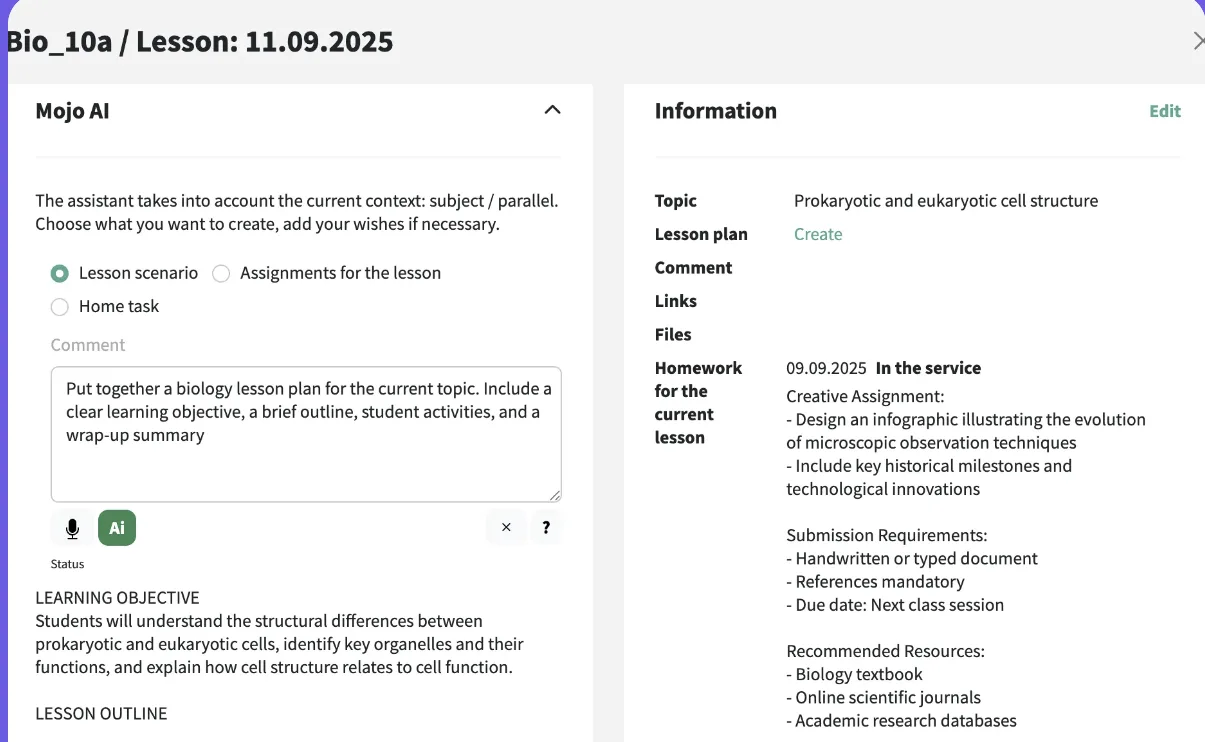
    • Lesson plans for different subjects and levels
    • Homework based on what students have already covered
    • Additional materials for students who need more support or are ready to move ahead
    Mojo AI panel in a Biology lesson: a prompt and the lesson plan it produced

    Turn voice notes into ready-to-use comments

    Teachers can dictate comments in reports, Mojo Points, school news and student meetings. Mojo AI turns speech into text and helps refine the wording into a clear, professional and personalised comment.
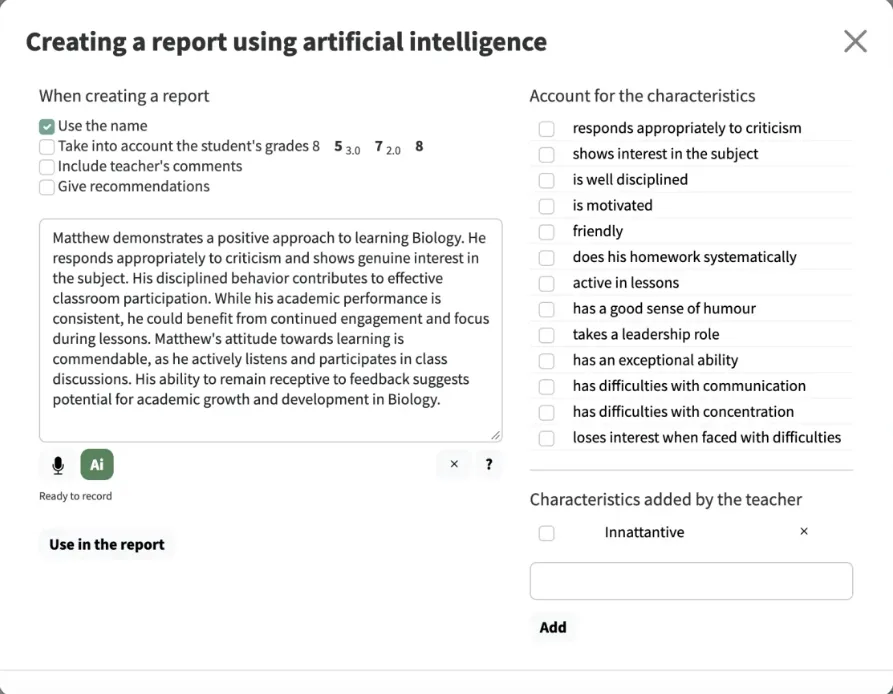
    • Dictate wherever a comment is needed
    • Takes the student’s grades and characteristics into account
    • The teacher reviews the text before it goes into the report
    Creating a report comment with AI: options on the left, the drafted comment, student characteristics on the right

    Create school news with AI

    Create updates for parents and students more quickly. Mojo AI can help draft the text, organise it clearly and edit the final version directly in the news editor.
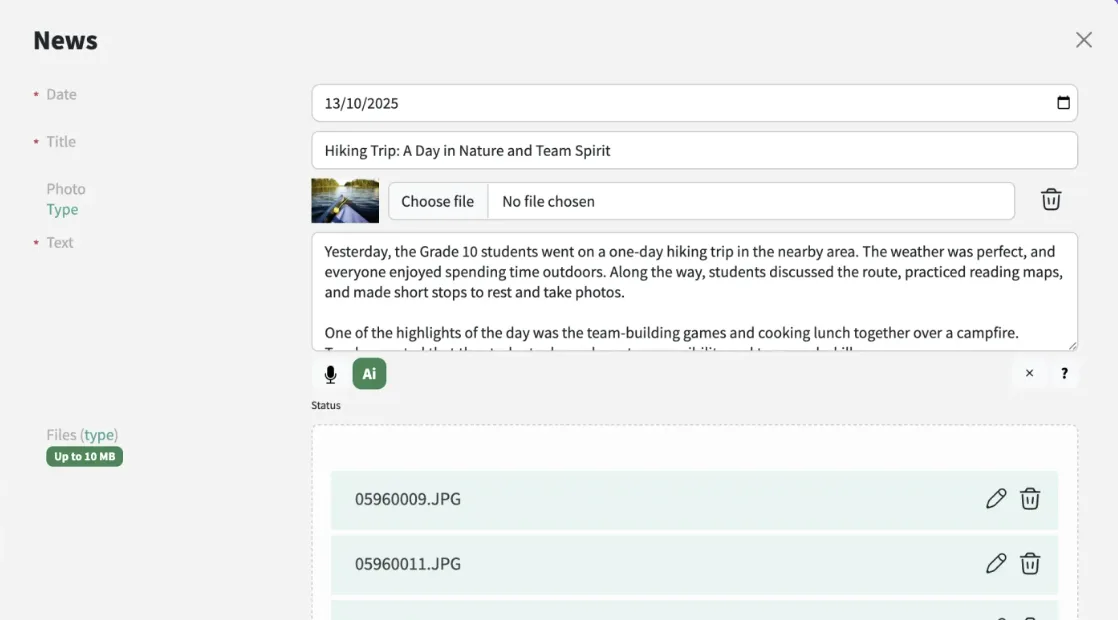
    • A draft from a few notes or a dictated summary
    • Clear structure for parents and students
    • Editing stays in the news editor
    News editor with a drafted article about a class hiking trip

    See Mojo AI on your own school’s subjects and classes.

    Get a demo

    For school leaders

    AI analytics for academic leaders

    Mojo AI brings school data together so leaders do not have to collect and compare information manually. It can highlight students and classes that may need attention and show the data behind each result.
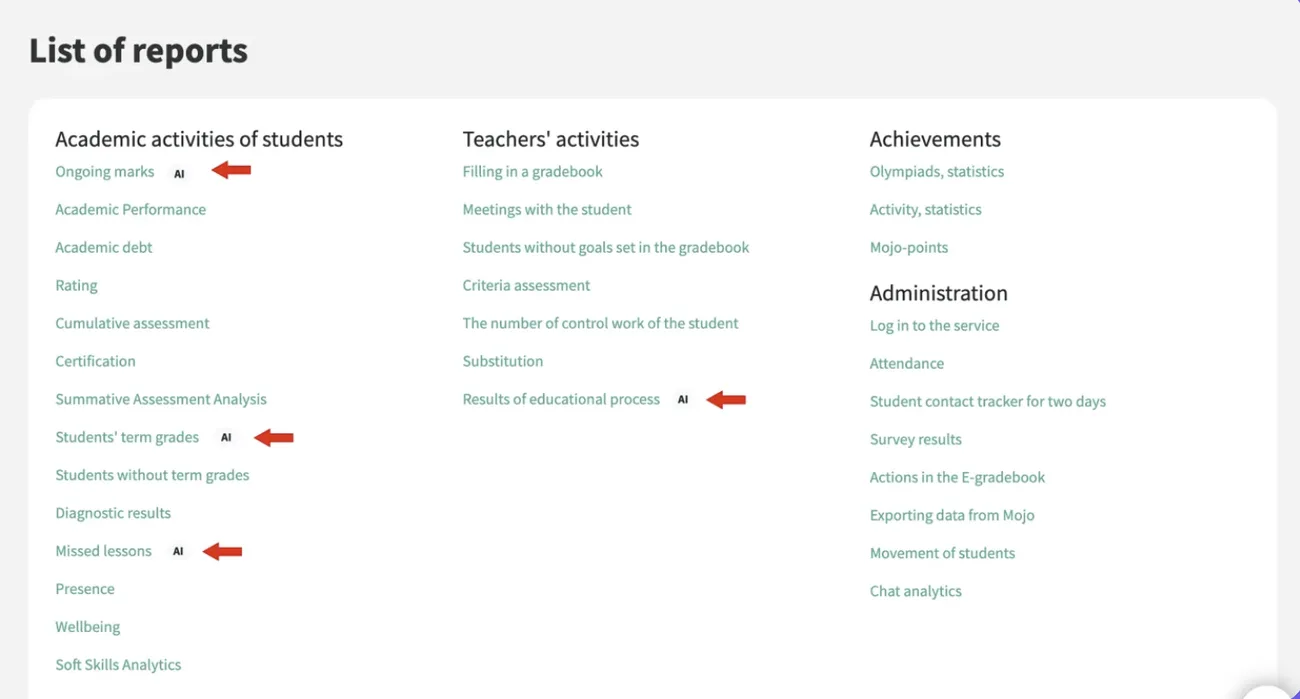
    • An overview of classes, subjects and teachers
    • See where performance is beginning to fall and when the change started
    • Recommendations based on school data
    List of reports in Mojo with AI available for marks, term grades, missed lessons and results
    Early warning

    Bullying alerts and smarter chats

    Mojo AI can identify discussion topics, group related messages and flag possible signs of bullying. This helps school staff notice situations that may require attention and respond sooner.
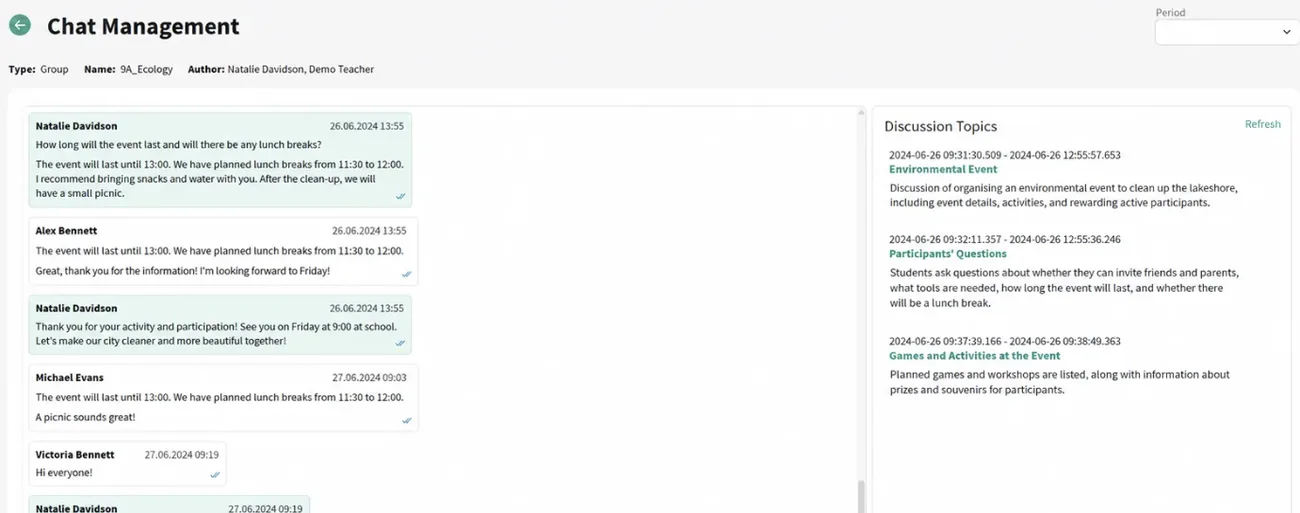
    • Possible signs of bullying are flagged for staff
    • Long chats summarised by discussion topic
    • Related messages grouped together
    Chat management screen with a list of discussion topics found by Mojo AI

    For everyone

    AI support across the platform

    The AI assistant can answer questions about Mojo, help users find the right feature and explain how different parts of the platform work without having to contact support.
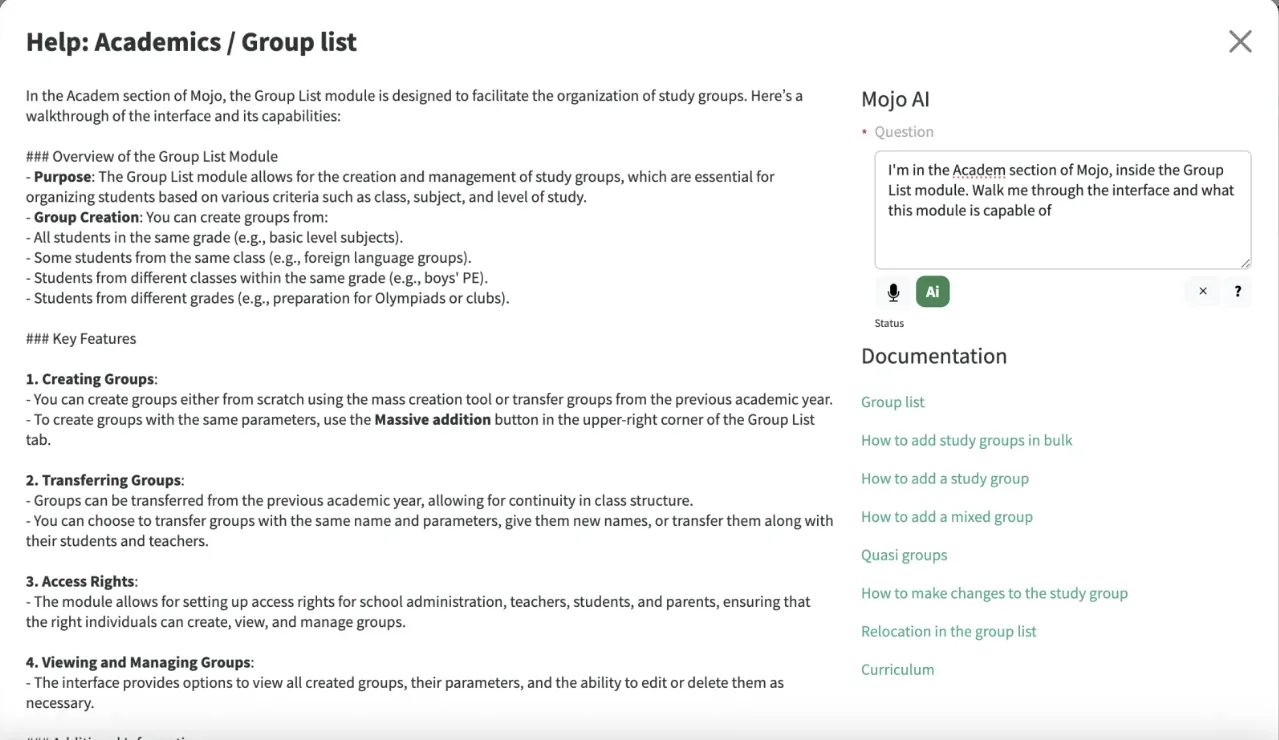
    • Answers about the module you are in
    • Links to the right documentation
    • Questions by text or by voice
    Help window: Mojo AI explains the Group list module and links to documentation

    Find the right solution for your school

    Flexible pricing for schools of different sizes and needs. Choose the plan that works for you, with clear terms and flexible options.

    How many students?

    How would you like to pay?

    Modules

      Compare all plans

      Mojo lets you start with the essentials and add extra modules whenever you need more. Add-on prices are per 12 months.

      Core Module Package

      All the key modules for running your school are included as standard in every plan.

        Questions before you start

        All questions and answers

        Questions and answers

        We answer popular questions.

        Before you start

        Already using Mojo

        Didn’t find your answer?

        Sales: sales@mojo.education
        Technical support: support@mojo.education

        Write to us on WhatsApp

        Get a demo

        Blog

        Read, discover and find new ideas with us.

        Experience Mojo in action

        Mojo is more than just a gradebook. It helps with the day-to-day running of your school, making admin easier, communication clearer and collaboration more effective.

        Freeno commitment60 minuteswith a specialistOnlineat a time that suits you

        What to expect on the demo

        • A personalized walkthrough of the Mojo platform tailored to your school’s needs
        • Demonstration of key features: automation, communication, and analytics
        • Time for your questions and an implementation plan
        • Afterwards: one month of free access with a real group of your students

        Book your demo

        We’ll contact you to set a time for the presentation.

        Feedback from our customers

        Ruslan Galimzyanov
        “Thanks to Mojo, we were able to optimize processes, simplify staff workload, and improve the overall efficiency of our schools.”
        Ruslan GalimzyanovGeneral Director, Heritage Education Group
        More about Mojo
        Mojo news

        All Summer 2026 Updates in Mojo

        New modules, useful features and mobile app updates that make everyday school management in Mojo even easier.
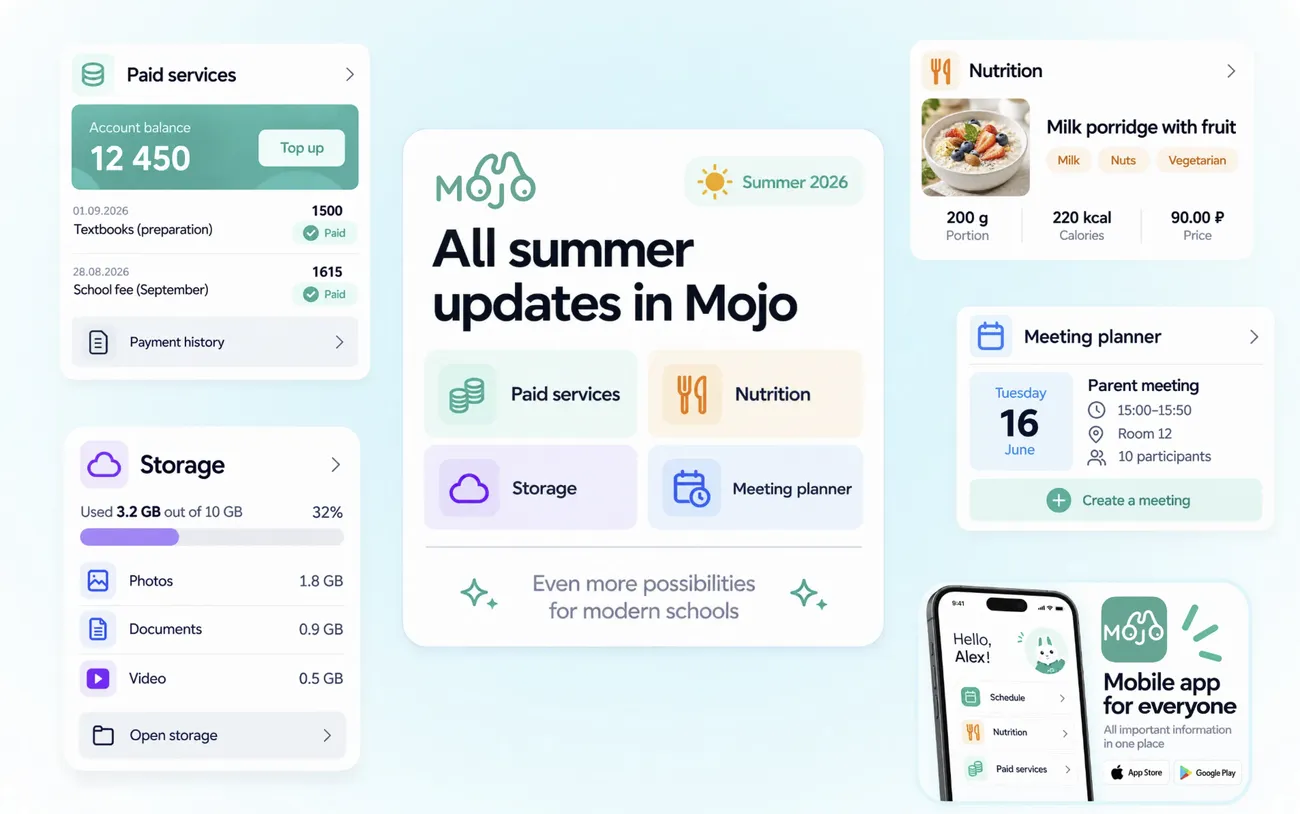
        Collage of the summer updates: paid services, storage, nutrition, meeting planner and the mobile app

        New modules

        Six major tools help schools automate timetabling, paid services, school documents, meetings, file storage and boarding.

        For school leaders

        Automatic Timetable Builder

        The module automatically builds a timetable for the whole school, taking into account teaching loads, staff availability, classes, rooms and the rules set by your school.
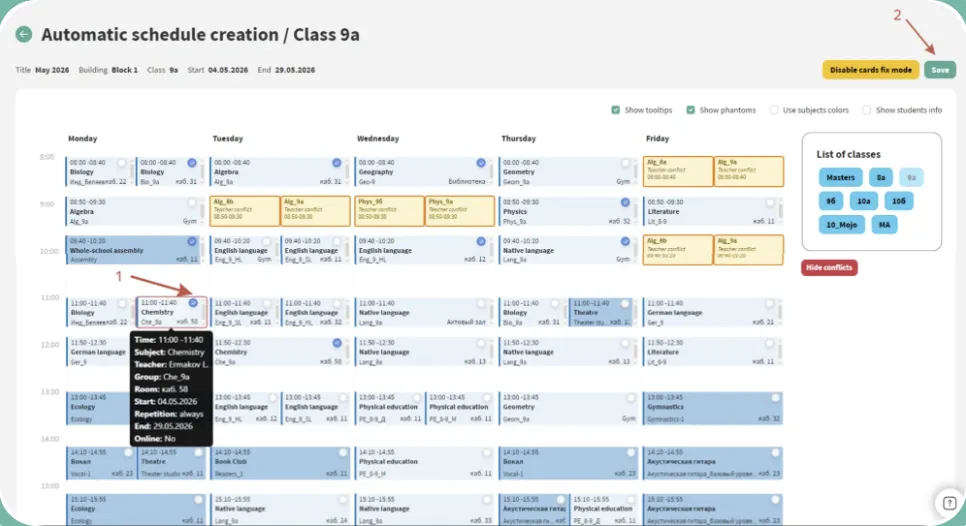
        • Creates a separate timetable draft for a selected period without changing the live timetable
        • Can build a timetable from scratch or use the current version as a starting point
        • Checks for conflicts and allows lessons to be moved manually
        • Keeps lessons that are already well placed and rebuilds only the parts that need changing
        What this gives your schoolFaster timetable preparation: the system takes constraints into account, identifies conflicts and reduces manual work.
        Learn more about the module
        Automatic schedule creation for class 9a, with conflicts highlighted
        For teachers and parents

        Paid Services

        Three connected areas help schools manage additional services, paid clubs and school meals through the same system.
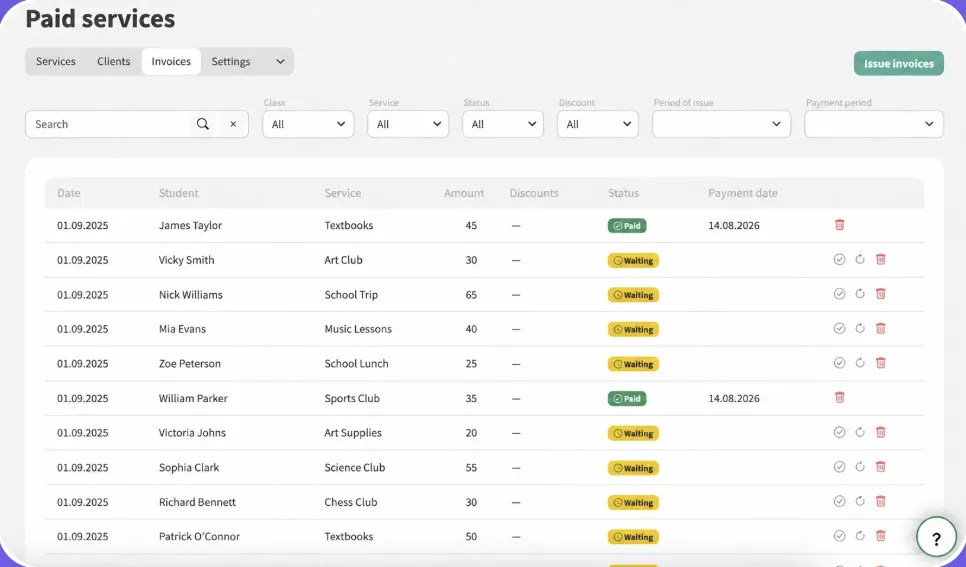
        • Create services and set prices, schedules, capacity and charging rules
        • Publish services in the catalogue and assign them to a student or an entire class
        • Automatically create student accounts and issue invoices
        • View balances, outstanding payments, invoice status and payment history
        • Record payments manually or connect an online payment provider, so parents can pay in the mobile app
        What this gives your schoolA connected process for managing additional services, from enrolment and attendance to charges, invoicing and payment.
        Learn more about the module
        Paid services: a list of invoices with their payment status
        For teachers and parents

        Paid Courses

        The module supports clubs and additional classes where schools need to manage both payments and the learning process itself.
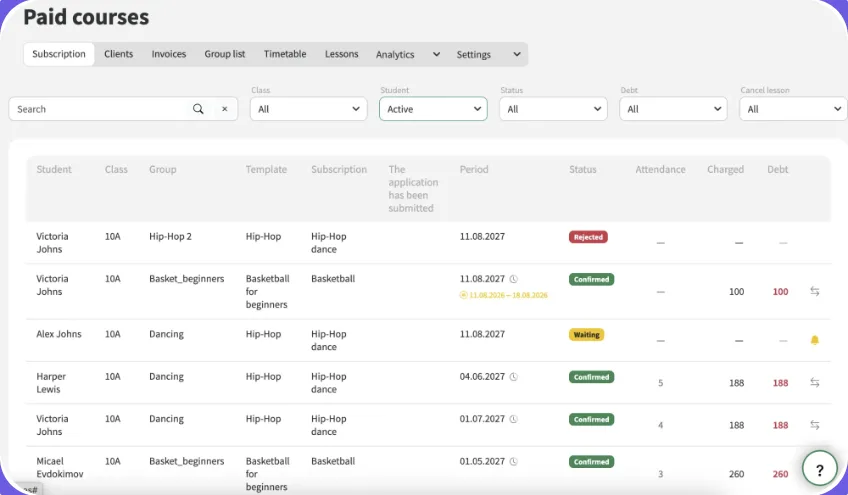
        • Create teaching groups and assign students
        • Schedule classes
        • Set up subscriptions and accept applications from parents
        • Track attendance and completed or cancelled lessons
        What this gives your schoolClubs and extra classes run in the same system as the rest of the school.
        Learn more about the module
        Paid courses: subscriptions with status, attendance and charges
        For teachers and parents

        Nutrition

        The module supports the full school meal process, from creating menus and setting individual requirements to recording meals, issuing invoices and taking payments.
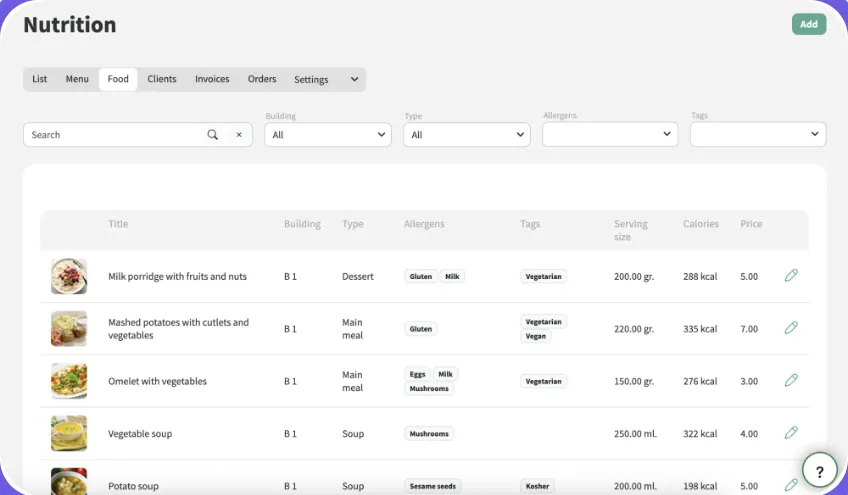
        • Create dishes and menus with allergens, calories, portion sizes and prices
        • Set individual meal plans, discounts, meal packages or free choice of dishes
        • Allow parents to choose meals and record whether a student has eaten
        • Manage orders, charges, invoicing and payments
        What this gives your schoolSchool meals, from the menu to the payment, in one place.
        Learn more about the module
        Nutrition: a list of dishes with allergens, serving size, calories and price
        For teachers and parents

        Meeting Planner

        The module helps organise consultations, staff meetings, parents’ evenings and other school meetings.
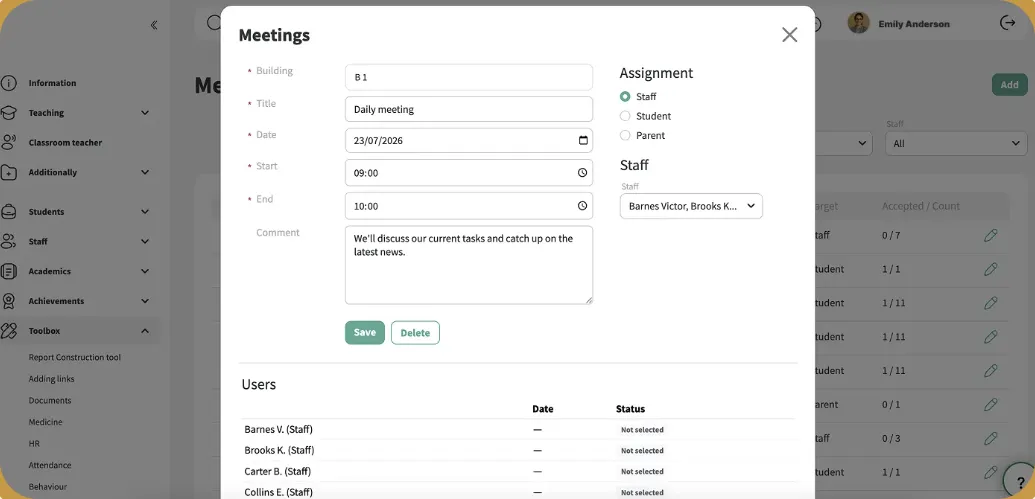
        • Create a meeting in the planner or directly from the school timetable
        • Invite individual staff members, students and parents, or an entire class or group
        • Send notifications, let participants accept or decline, and show responses to the organiser
        • View meetings in a searchable list with filters by date, building and staff member
        • Automatically add meetings to participants’ schedules on web and mobile
        What this gives your schoolA connected meeting process: invitations, responses and changes are automatically reflected in participants’ schedules.
        Learn more about the module
        Meeting form with date, time, participants and their responses
        For school leaders

        Storage

        The module helps schools monitor cloud storage, identify the largest files and free up space when it is needed.
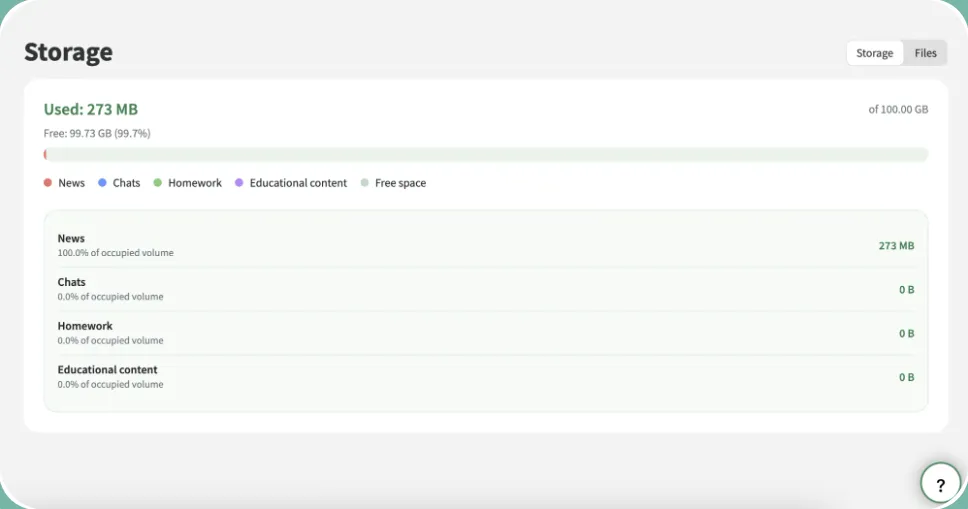
        • Browse files uploaded through news, homework and chats
        • See used, available and total storage, and how space is split across file types
        • View each file’s type, name, author, publication date and size, with filters and sorting
        • Allow authorised users to remove unnecessary files and free up storage immediately
        What this gives your schoolClearer storage management: administrators can see what is using space, find large files quickly and free up capacity.
        Learn more about the module
        Storage: used and free space by source
        For teachers and parents

        Boarding

        The module is designed for schools where students both study and live on campus.

        • Create boarding buildings and rooms and assign boarding staff
        • Allocate students to rooms
        • Manage requests to leave campus with approval from parents and boarding staff
        • Show permissions in the Entrances & Exits section
        • Provide a dedicated chat with students and their parents
        What this gives your schoolA connected process for supporting boarding students, from room allocation and leave permissions to communication between boarding staff, students and parents.
        Learn more about the module

        Updates to Existing Modules

        Existing tools are now easier to use, better connected and support new ways of working.

        • For teachers

          Learning Content

          Create and share learning materials using AI, assign courses to students or whole groups, and track progress, completion and assessment results in the gradebook.

        • For parents

          Admissions and Chats

          Parents can track their child’s application, check its current status and upload photos or documents directly from the applicant profile.

        • For school leaders

          Roles and Permissions

          Schools can organise related tasks and permissions into processes, making it easier to manage who can do what across the platform.

        • For teachers

          Video Uploads

          Upload up to 15 videos at once to news posts, chats or homework, with a combined file size of up to 1 GB. Photos and videos appear together in a single media gallery.

        • For teachers and parents

          Customise Mojo for Your School

          Customise the sign-in page with your school’s logo and background to create a familiar experience for staff, students and parents.

        • For school leaders

          Custom User Fields

          Add custom fields to student and staff profiles, fill them in bulk from an automatically generated Excel template and choose which fields to export.

        Small but Useful Updates

        Small improvements reduce everyday admin and give schools more control over familiar processes.

        • New Help Button

          Administrators can contact support, browse FAQs or ask the AI assistant a question from anywhere in Mojo.

        • Required Homework

          Teachers can mark homework as required, and a dedicated report helps them follow up on outstanding work.

        • Find Lesson Materials Faster

          Browse resources by topic or use specific search criteria to quickly find what you need.

        • Control Changes to Past Marks

          Choose how far back teachers can edit marks: two weeks, one month, the current reporting period, or without restrictions.

        • Custom Year Group Names

          Rename year groups to match your own structure and hide any you don’t use.

        • Sibling Links

          Student profiles now show siblings who attend the same school.

        • Message Reactions

          Respond to messages with a reaction instead of sending a reply.

        Mobile App Updates

        The mobile app now includes new features for parents and school staff, allowing more everyday tasks to be handled directly from a smartphone.

        • For parents

          Pick Up a Child

          Parents can let the school know in advance through the app that they are coming to collect their child, without having to call or message staff.
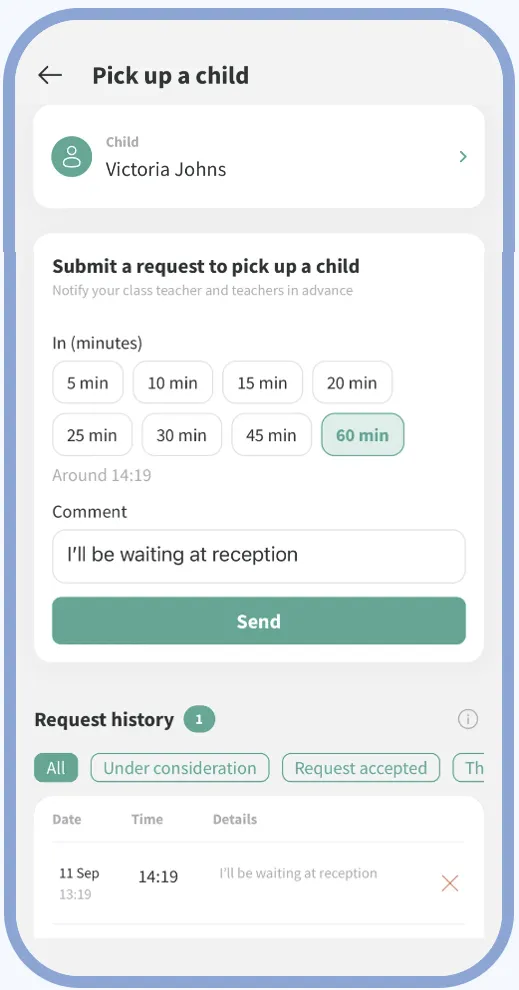
          Mojo mobile app: Pick Up a Child
        • For school leaders

          Lesson Substitutions

          School leaders can view current lesson substitutions from their phone and keep track of timetable changes more easily.
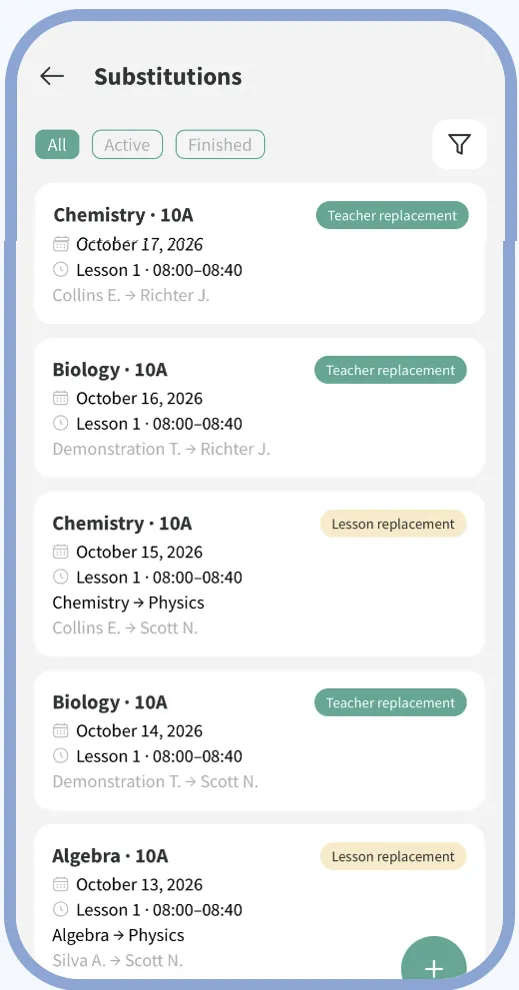
          Mojo mobile app: Lesson Substitutions
        • For form tutors and school leaders

          Wellbeing

          Form tutors and school leaders can use student wellbeing tools directly in the mobile app.
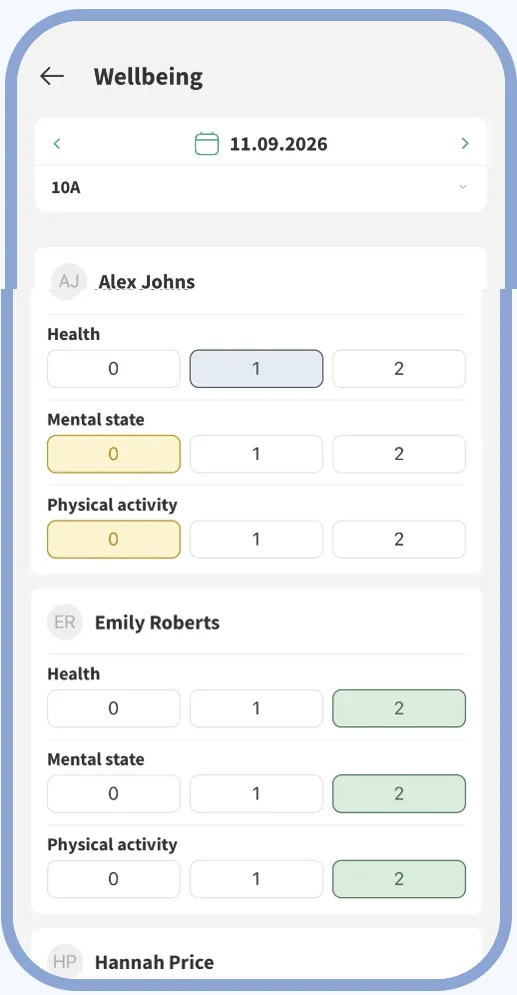
          Mojo mobile app: Wellbeing
        • For parents

          Paid Services

          Parents can view charges and pay for additional school services directly in the mobile app.
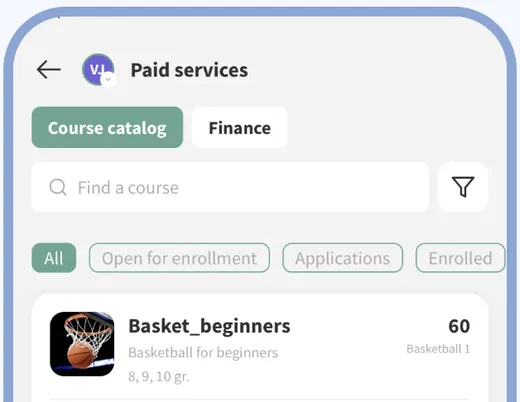
          Mojo mobile app: Paid Services

        Mojo Is Becoming Easier for the Whole School

        The summer updates support school leaders, teachers and parents. Major modules automate entire processes, smaller improvements reduce everyday admin, and the mobile app brings more day-to-day tasks to users’ phones.

        We continue to develop Mojo around the needs of schools and feedback from users. Follow our updates to see what comes next.

        Read also

        All articles

        Get Started with Mojo

        Our specialist will give you a personalized demo and show the platform’s features in action.

        One month of free access after the demo